Bitaxe
Bitfortun BS-1 Hashrate: The 400 GH/s Screen Offset
Bitfortun's published BS-1 firmware still adds 400 GH/s to the number on its screen. Here is how to check your rig's real hashrate against your pool's record.
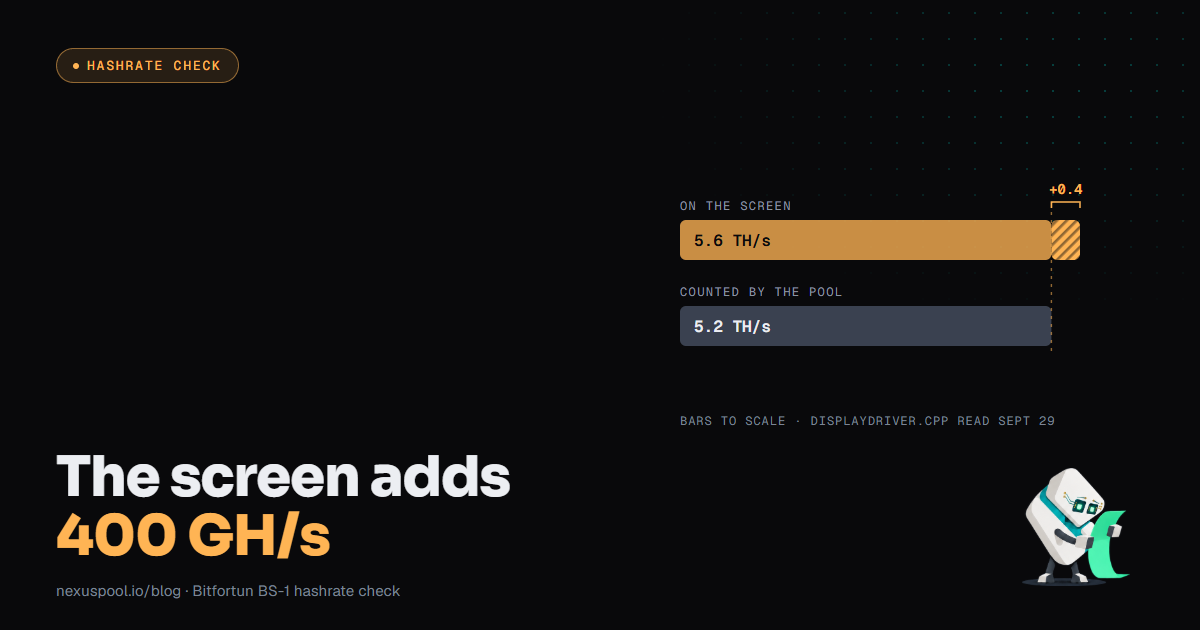
The Bitfortun BS-1 is a compact single-chip BM1373 home miner that launched in August 2026, sold as a 5.5 TH/s machine and listed at $229 by one reseller. On September 10, Solo Satoshi published what a community review of the firmware source had found: the code that draws the Bitfortun BS-1 hashrate on the device screen adds a fixed 400.0f, meaning 400 GH/s, to the real reading before it prints the number. The firmware forks the NerdQAxe+ branch of ESP-Miner, the open firmware family behind the Bitaxe, and the upstream project has no such line. We read both repositories on September 29, and the offset is still in the vendor's published code. At 0.4 TH/s on a unit that hashes near 5.2, the offset is small enough to look plausible. That is a reason for a five-minute check on your own rig, whatever brand you run.
What the Bitfortun BS-1 hashrate audit found
The claim is narrow and checkable. According to the Solo Satoshi report, the screen driver in main/displays/displayDriver.cpp takes the 10-minute average hashrate from the system module and adds 400.0f before formatting it for display, and the same padded value feeds the efficiency figure printed beside it. A slower chip looks faster and more efficient in one glance. A second, smaller offset of 0.4 sat in the history code. The firmware is public on the vendor's GitHub account, so any reviewer can diff the vendor repository against the NerdQAxe+ project and see that the extra term appears only in the BS-1 code. asic.tools also covered the finding and noted its own limit: it tested no physical unit.
The code has changed since. The vendor reorganized the repository on September 16, and in the new layout the history-code offsets are gone. The display lines remain. On the main branch, at its newest commit (September 22, a README edit), lines 833 and 835 of the display driver still add 400.0f to the current hashrate. Reports also differ on where the padded figure shows up. Solo Satoshi found the main hashrate field in the device API unpadded, while another reviewer says the web dashboard and monitoring apps display the higher number too. We found no vendor explanation for the line, and a diff cannot tell a motive from a leftover test build. The finding that holds up is smaller: a screen number and a real number can drift apart, and a solo miner cannot tell which one is on display without checking somewhere else.
Why a padded hashrate changes the odds you think you have
Most home miners look at one number, the screen figure, and it is the one that goes into an odds calculator. A rig's chance of finding a block is its hashrate divided by the network's, and its expected wait in years is the reciprocal of that chance divided by the 52,560 blocks Bitcoin averages in a year. Difficulty has held at 132.76 trillion since the September 19 adjustment, which implies a network near 950 exahashes per second (difficulty times 2^32, divided by 600 seconds).
Take a BS-1 that hashes 5.2 TH/s, the stock figure one review lists after correcting for the offset. Solo Satoshi works from a screen reading of 5.5 and lands on 5.1, so the range is narrow. At 5.2 TH/s the chance per block is about 1 in 182.8 million, an expected wait near 3,480 years. Feed the padded screen reading of 5.6 TH/s into the same math and the chance becomes about 1 in 169.7 million, an expected wait near 3,230 years, about 7% shorter. Both figures are averages over a wide spread, not schedules. Difficulty sets the odds for every miner at every pool, NexusPool included, and no firmware or pool changes that. A padded display shifts what a miner believes about their odds and leaves the odds where they were.
A five-point check of your Bitfortun BS-1 hashrate
The check takes an afternoon of waiting and five minutes of work, and it applies to any miner that shows its own hashrate.
- Note your firmware's origin. Record whether the unit runs the manufacturer's stock build or a community one. The reports above disagree on which screens show the padded figure, and a community build may not match the vendor's.
- Read the source if it is public. Open-hardware miners publish firmware so this check is possible. Find the function that writes the hashrate to the display and see whether it reads the rolling average directly or adds something to it. NexusPool's technology page takes the same approach to shares, laying out how each one is read and tested so a miner does not have to take a number on faith.
- Compare the device with your pool over a long window. A pool counts the shares you submit, at the difficulty it served, over real time, and none of that passes through your device's screen. NexusPool's Glass Ledger signs a receipt each hour for each rig with the shares counted, the difficulty they were served at and the window they landed in, and you can check it against the published key on the site or in your own code.
- Look for a gap that lasts hours. Hashrate is noisy over short windows by design. A screen figure that sits a fixed amount above the pool's accounting, hour after hour, is the pattern that needs action.
- Redo your expected wait with the pool-side figure. If the two numbers differ, use the pool's for any odds or wait-time math.
What this does not change about the odds
Network difficulty sets the odds of finding a block, and it is the same for every rig at every pool. An expected wait is an average, and a small unit's chances come from its small share of the network, not from a friendlier display. This post does not claim Bitfortun set out to mislead anyone or that every unit behaves the same way. It covers one code finding and what the vendor's repository shows today, then offers a habit worth keeping whatever brand sits on your desk: the rig's screen is not where your real numbers live.
If the numbers differ, trust the pool-side record
If your device's hashrate tracks your pool's recorded shares within normal noise over several hours, there is nothing to do. If a steady gap appears, treat the screen number as unverified and use the pool's records for any decision that depends on your real output, including whether troubleshooting the unit is worth your time. NexusPool pays any block a rig finds directly to that rig's own address at a 0% fee and holds no balance, and Payout Preflight shows the exact coinbase transaction for your address before a block is found. The number to trust for your rig's real output is the one the pool counted and signed, not the one on the screen. Trust nothing. Verify your rig's real hashrate against your pool's own record, not its display.